D.I.Y. – US Tourist Visa Application 2025

OK, step by step guide on how to apply for Tourist VISA to the USA. I’m making this post as simple as possible, with screenshots, so you know what to expect. DIY po itong application ko. I did not apply through an agency.

Disclaimer lang muna. First, this process is as of July 2025. There may be updates in the future, along with the transitioning of the US Administration. Second, this guide solely gives light on US Tourist Visa Application for Filipinos living in the Philippines; Non-immigrant po at walang plano mag TNT. To be specific, B1,B2 ang term nila for regular tourist visa. Lastly, this guide does not guarantee your approval. Depende po sa ganda. Charot! Pero di nga, if you find visa application overwhelming, mag agency po tayo for more chances of winning. ems! If mag agency po, please check on reviews first kase dami scammers today.

My application in a gist:

  • Magpapicture ng 2×2
  • Accomplish the DS 160 Application form online (For tourist B1,B2)
  • Pay the Visa fee
  • Schedule Appointment for Photo & Biometrics at VAC, then for Interview at the embassy
  • Personally attend the scheduled Photo/Biometric and interview

First step: Magpapicture sa studio. inuna ko ito kase the softcopy/jpeg file is needed during the second step. You will also submit 2 copies of this during the interview at the embassy.

Photo requirement: 2 x 2 inches, square, without borders. The applicant’s head (measured from top of the hair to the bottom of the chin) must measure 25 mm to 35 mm (1 inch to 1 3/8 inch); the applicant’s eye level must be 28 mm to 35 mm (1 1/8 inch to 1 3/8 inch) from the bottom of the photo. NO EDITING OF ANY SORT. NO EARRINGS FOR MEN. You will need both the printed copy 2×2 and the raw file to upload. A US visa photo must be a JPEG (.jpg) file, 600×600 to 1200×1200 pixels, with a square aspect ratio and a file size no larger than 240 KB. 

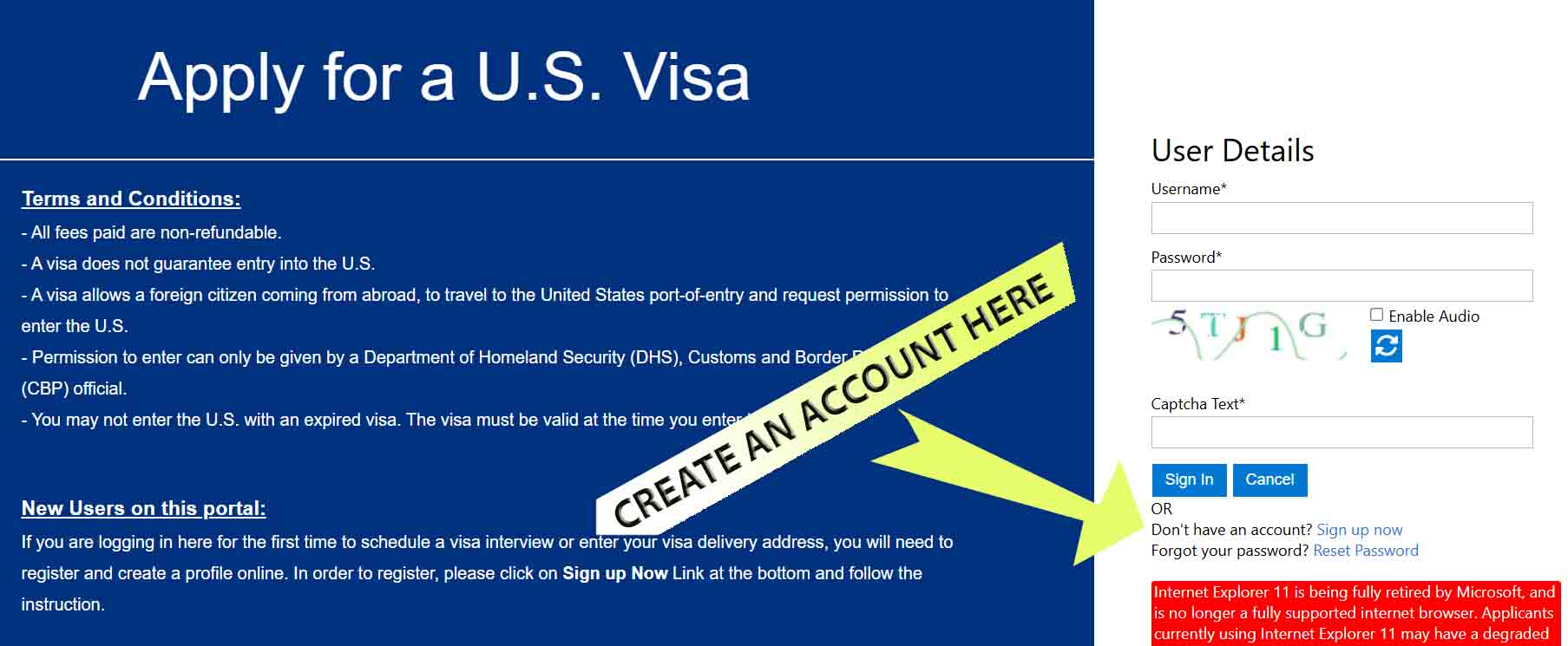
Second Step: Accomplish the DS 160 Application form online. Log in at ustraveldocs.com , choose Philippines as base and non-immigrant Tourist B1/B2 as visa type. You will be asked to create an account before proceeding. Sign up with your valid email, contacts and assign verification questions. For Reference, ganito to ang look ng site.

After signing up, you will automatically be redirected to the DS 160 page, as shown below. (https:// ceac.state.gov/genniv/). After sign up and all, select “Start an application” and you will be given a unique Application ID. Take note of this so you can retrieve your application if mag close. Note that you don’t necessarily have to accomplish this form in one seating. Pwede naman po save2x.

Ok, this is the part where you will give personal information, travel plans, work, education etc. See the screenshot below, ito po ang starting page. Mahaba po ito pero basic questions lang naman, just like any other visa application. Answer truthfully. Re the travel plans, not necessary naman po may return ticket na or what. Just give your intended dates and what you want to do.

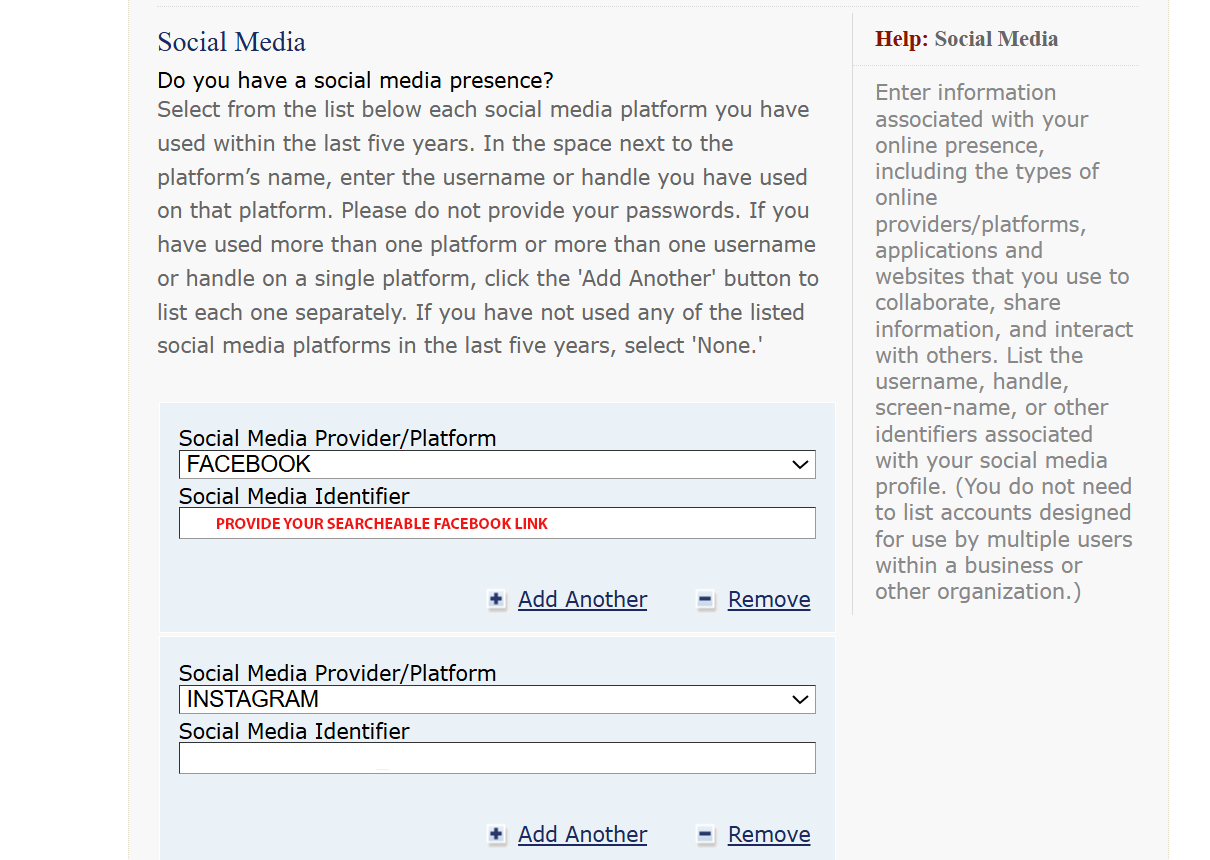
You have to declare everything that’s being asked. Your income, profession, your previous jobs, including the name of you ex-boss or HR, your travel history the last 5 years (if any), and yes po, DECLARE all SOCIAL MEDIA ACCOUNTS set on public mode. I submitted my Facebook, IG, Tiktok and this website that you are currently at.

DS 160 will also ask you for a contact person in the US. Friend, relative or what. Needed po contact and address niya. I was told na may cases, tinatawagan po ang declared contact for verification. Though hindi po tinawagan akin. You also have to declare the organizations you belong to.

Here are some other questions that you have to address. Answer truthfully lang po.

After completion, upload the 2×2 photo file, then review muna. Edit if you have to. Make sure kaya mo mapanindigan all the declared info, as these MAY be asked again during the personal interview.

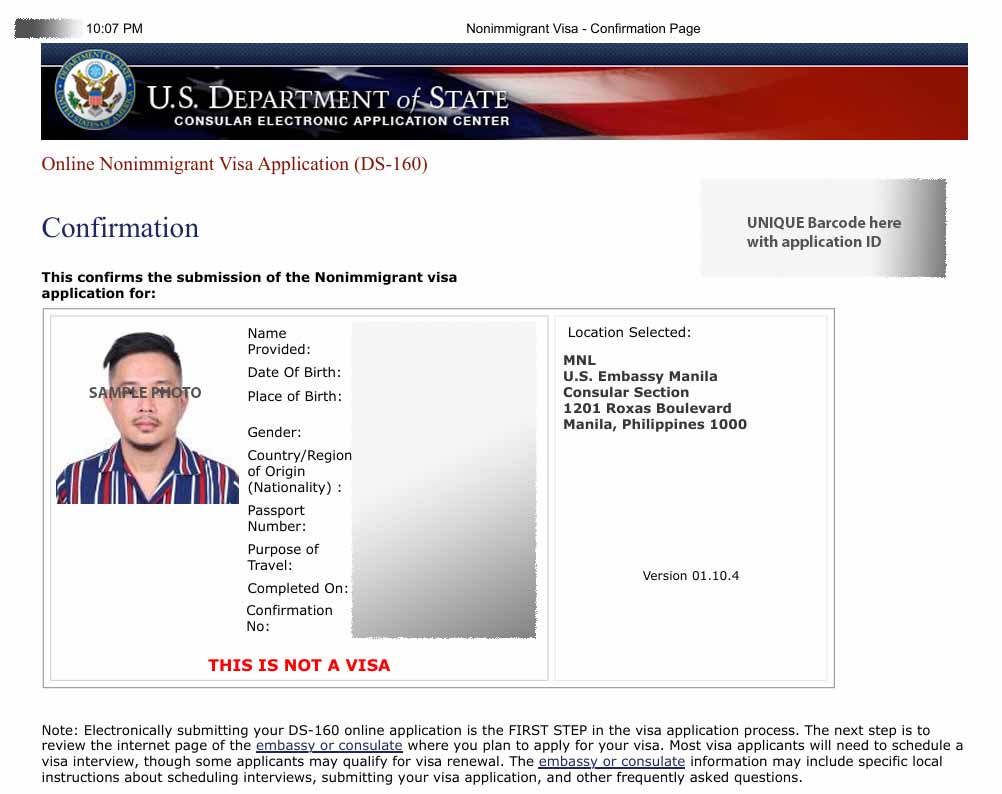
After submission, you will be given a CONFIRMATION LETTER. ganito yun.
Overwhelming ba mag DIY Application? oh mag agency ka na. If ok pa, the read on.

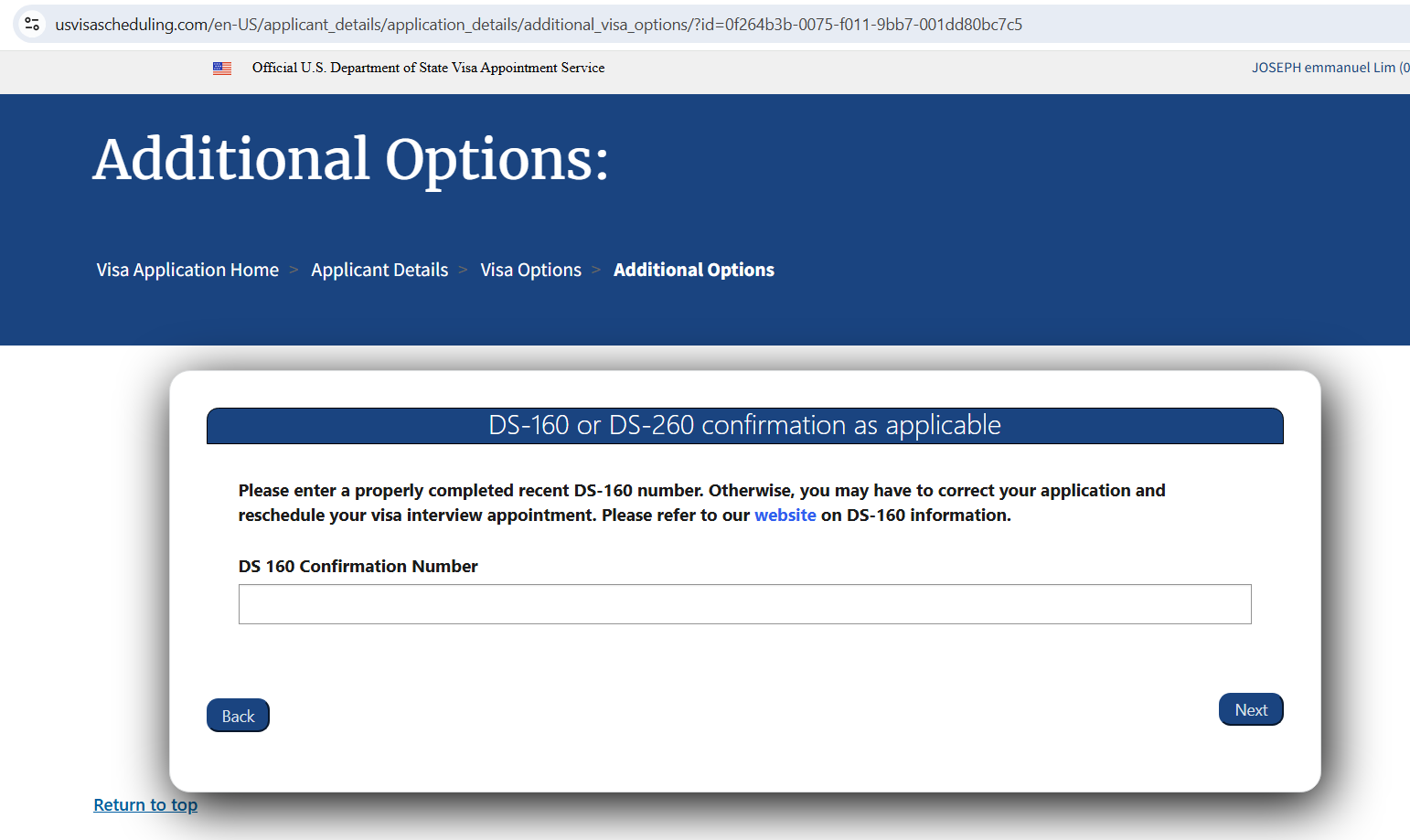
Third Step: Payment of Visa fee before you set the interview appointment. This is done at another website —> usvisascheduling.com. See screenshot below. Sign in with your valid email and contact, log in, then start new application for interview. You will be asked to encode the application number that was given to you with the submitted DS 160 form kanina; nasa upper right side ng confirmation letter.

Just go through the steps until you reach the payment interface. Yes po, payment muna before you get an access to available dates for interview.

The cost of Regular Tourist Visa B1/B2 is 185 USD or 11,100 Pesos as of July 2025. After this, you will be prompted with a Slip/Notice of payment with instructions on how and where to pay. Download and print this slip and submit nyo po sa teller, as they will need to encode also your details at time of payment. Sa RCBC po ako nag-pay, over the counter cash deposit. I also brought with me sa bank my passport at yung DS 160 confirmation letter, just in case. The slip looks like this.

After payment, sabi you have to wait 24 hours for validation. As in my case, I paid at the RCBC Branch nearest sakin at 9 am, and I had my payment reflected na sa website by 10 am. You can check this sa USVisadocs.com account ninyo.

Fourth Step: Select appointment date for Photo and Biometric (fingerprint scanning), and a separate date for interview with the embassy.

Yes po, two appointments: one for Photo/biometrics enrollment and the other for the interview at the embassy.

Previously, the collection of biometrics is done on the same date as with the interview at the embassy. But with the new visa application system, you are required to schedule a separate appointment to the newly launched Visa Application Center (VAC) at Parqal Mall in Parañaque (Manila) for your biometrics enrollment. I read may Visa Application Centers na din daw sa Cebu at Davao that accepts this step. Google nyo na lang. As with my case, Manila po ako nag-process.

To schedule, log in again on your USTravelDocs.com account. Once the payment has already been reflected in your account, you may now proceed with the scheduling. You will first select a date for the biometric, then afterwards, the site will lead you to the available dates for interview.

IMPORTANT: The date of biometric and the interview could be one week apart to a month. That is why it is crucial to apply for visa early, if meron po tayong fixed date or event kailangan mapuntahan sa US. I say 6 to 10 months prior to your desired date of flight.

Overwhelming na ba ng todo? again, pwede po mag hire ng agency to assist you.

After selecting the dates and respective time slots, you will be given slips with your details. Download and print this along with other documents necessary to submit.

Fifth Step: Attend to the scheduled appointments. Yes po, ako na taga Gensan, lipad po tayo to Manila on the dates, and mindful tayo sa timeslot assigned.

Photo and Biometrics Address: US Visa Application Center (VAC). Third Floor, Parqal Mall Building 8, Parañaque, Metro Manila. Phone: (02) 7792 8988. Pretty straight-forward transaction here.

Interview: Embassy of the United States of America. 1201 Roxas Blvd, Ermita, Manila, 1000 Metro Manila.

My interview was scheduled at 8 am, but I was already outside the embassy as early as 5:30 am. Mainit po around 6:30 na. FYI. Pipila po tayo sa labas tlga under the harsh environment. Madaming checking at stages before makapasok sa building mismo.

Essential Documents na dinala ko, as specified in the confirmation letter:

  • Current-valid passport
  • previous passports with travel history.
  • DS-160 Confirmation Letter: (DS-160). Color-printed. US Letter-sized paper
  • Appointment Confirmation Slips. Color-printed. US Letter-sized paper
  • Photographs: Dalawang 2×2.
  • Visa Fee Payment Receipt: Deposit Slip. Photocopy and original.

Supporting Documents na Dinala ko din: PSA Birth Certificate, Valid PRC IDs, Latest ITR ko, at latest bank statement with average daily balance; pero itong bank statement, hindi na po ito hinanap ng interviewer.

If you are employed, needed po to bring your company id and certificate of employment. As per my case, practicing professional po ako. So i brought my PRC ID and the ITR.

I highly suggest you place all your documents in a clear plastic envelope.

Nagdala din po ako black ballpen. I noticed madami nagbebenta ballpen sa labas for 50 pesos.

Hindi po ako nagdala ng Cellphone. Bawal po. Iniwan ko po sa hotel. Bawal din water or food.

The procedure inside the embassy: may initial validation with a filipino employee ng embassy. Parang front desk. Then after this, pasok po sa isang bigger room with windows for the interview proper.

– If your application is approved, they will take your passport.
– If your application is rejected or denied, they will tell you right away.

The Interview proper took only five (5) minutes sa case ko, o less pa. It’s very quick because most probably, applications have been evaluated even before the interview. Likely, they already have a tentative decision prior to your appointment, and the interview is just for validation/consistency of declared details as per your DS 160 form. As per my experience, I was only asked what my job is and the purpose of my travel to the US, which I answered “just for vacation/holiday”, and done!

So yun po ang process ng application ko. I clearly remember na generous yata sila sa pag-grant during our date. Lahat kami sa line, magkasunod na approved.

Formula to get an approval? Prove your ties with the PH. As per my case, I feel that my job as a Licensed Architect here for several years already, gave them an impression that I have no plans of finding work in the US, and that my job is stable. My travel history probably gave a good impression as well. Financial situation? I don’t think so, as the officer never asked me to show any document pertaining to that. Baka lucky day ko lang din gid.

In doubt with your chances? I say again, go get an agency to assist you.

Easy Japan Tourist Visa Guide for Filipinos

Hi Guys! I just came back from my Japan trip and I will be posting a series of blogs re the ups and downs of my journey for everyone’s future travel reference. So much stories to tell; from all the bento kiosks and good ramen shops that I found, to getting lost on Japan’s massively overwhelming train network. But first, fundamental requirement muna tayo guys. I will be discussing below the basic requirements for Tourist Visa Application. Hope this helps!Collage_Fotor_Fotor.jpg

Now is really a good time to visit Japan as Cebu Pacific will start flying Daily from Cebu to Tokyo-Narita and back, starting December 1, 2018. This direct flight made the travel time more practical for us living in Visayas and Mindanao.  Flight only takes 4 to 4.5 Hours. And we don’t have to go though any NAIA fiasco na. Cebu-Mactan Airport is more chill (I swear!) and Prettier.

BASIC TOURIST VISA REQUIREMENTS (SINGLE ENTRY)

  • Philippine passport. Must have a signature and at least 2 blank pages. Must have at least 6-months validity.
  • A duly filled up visa application form. You may download it at https://www.ph.emb-japan.go.jp/files/000163096.pdf
  • ID picture. 4.5cm x 4.5 cm. Write your name and birthdate on the back side. Paste it on the application form.
  • Birth certificate from PSA. Must be issued within the past one year. Old birth certificates issued with NSO logo is not valid anymore. Dapat yung colored paper na with PSA logo, which you can order and pay online via https://nsohelpline.ph .  If may alterations or errors on your birth details, settle that muna with the agency.
  • Marriage certificate from PSA. Only if you’re married. If not, deadma.
  • Daily schedule. Your itinerary in Japan. It doesn’t have to be super detailed. Just indicate your projected date of arrival and departure, and the places you wish to visit during your stay on a day to day format (Day 0, Day 1, Day 2 etc).
  • Income tax return Photocopy (ITR Form 2316 for employees or Form 1701 for self employed). I also submitted the receipt or Landbank Deposit Slip for the ITR.
  • Bank certificate. Issued within the past 3 months. This part is very subjective. Some blogs say you are supposed to maintain +++100,000 Pesos. But i know people who had 50,000 Pesos only for a proposed 3 days trip, and she still got approved.
  • Optional na, but it is also best to submit a certificate of employment with your salary, position and company contact information. This will help you prove that you are indeed returning to the Ph and will not be TNT there. If self employed, a copy of your DTI Registration will suffice.
  • Photocopy of other government ID’s like SSS, Tin, Pag ibig, Postal, if have lang. but optional. Photocopy of Company ID also if employed. provide 3 specimen signatures on every copy.

Tips and Reminders

  • All documents, application form, itinerary etc must be printed on an A4-size paper.
  • Do not Staple or fold your documents. Folder nyo lang with clip.
  • Printed or hand written application form is OK. Black ink is preferred. No erasures.
  • If you cannot provide ITR and employment certificate, you may still take your shot by writing a cover letter explaining your side. Pero magdasal ka na. lol
  • And as I always recommend to my readers, especially for first timers, that “if you are unsure of the process, get a travel agency to sort out your documents for a fee.” For Davao residents, Traveloft, Inc. can assist you. (https://www.facebook.com/traveloft.davao/ )
  • We are NOT required to book flight or hotel yet. However, the application asks for a flight number and an address in Japan. To get a flight number, just log on to Cebu Pacific website and get the regular flight details. For the address in Japan, just write down your desired hostel or hotel (realistic to your budget/bank certificate, of course). The travel agency can help you with this.
  • Unlike other visa processes, Japan visa application cannot be submitted directly to the Japanese Embassy. All applications must be submitted through an accredited travel agency.  For the list, visit https://www.ph.emb-japan.go.jp/itpr_ja/00_000253.html; or just go to your trusted travel and tour, they can probably connect you to the nearest accredited agency in your region.
  • Application fee is at 1000 to 1,500 Pesos.
  • Once approved , your passport with visa sticker will be returned to you via your chosen agency. Releasing time takes 5 to 10 working days.
  • Application may be submitted as early as 3 months before your travel date.  Single entry Visa usually allows 15 days stay, at 90 days validity upon approval.
  • And lastly guys, this guide, like any other guide blogs, do not assure 100% approval. Ang iyong kapalaran ay nakasalalay parin sa iyong mga sariling kamay, kung malinis ba ito o hinde. Charot! Just provide all necessary documents and pray for the stars to align in your favour. Charot again! Mag patulong kayo sa travel agency oi!

And that’s it! I hope this checklist will be of help sa mga mag aapply.  Please note that this application guide only tackles Single Entry Tourist Visa. For Multiple Entry Tourist Visa, I will post a separate blog on that, if I got one na. For other types of Visa such as business, seafarer or Fiance, please check the Japanese Embassy website for the specific guidelines. For Application with Guarantor or sponsoring relatives in Japan, refer also to the embassy for your specific process.

To check on flight schedules, click here official Cebu Pacific Website.


Australian Tourist Visa: DIY Easy Online Application for Filipinos

Hey,hey,hey! I just got my Australian Tourist Visa approval a few weeks ago. The process is relatively easy and is very much DIY-able. Aside from rejoicing for the approval, I am also thankful that the Aussie Immig was generous enough to grant a multiple entry ’til 2020. Cool, diba? As such, I will be sharing here the step by step DIY guide I did for this application, para naman sabay sabay tayo mag selfie duon with the Koala Bears!

This blog guide however, shall focus solely on Tourist Visa – Online Application for Filipinos living in the Philippines. If you are looking for Business, Study or Fiance Visa, I reco you visit the main Australian Immigration Website at https://www.homeaffairs.gov.au/ for the specific process.

Yes po, Australian Immigration now accepts visa application online. Meaning, no more personal interview. You only need to prepare and properly scan your valid requirements, submit online and pay by credit card. If accepted and approved,the grant certificate shall be emailed to you. No more submission of passport to the embassy for verification and stamping. Easy breezy!

If opted, you can still submit your traditional application personally at the Australian Embassy via VFS Agency. But since I reside in a city that is 2 hours away by plane from the capital, it is more practical for me to do all transactions via online.

The difference between personal and online application? Walang Visa Sticker when applied online. In lieu, a grant certificate shall be issued via email, which you have to print and carry with throughout the trip. The traditional sticker eklavu on the passport are only given when documents are personally submitted.

Online application however, may still be required a personal interview if the evaluators find your documents questionable. That being said, let me just cite na din my travel blogger idol Aileen Adalid’s disclaimer, NO ONE can give you a guarantee on your approval — not even a lawyer, a consultant, a travel agent, or an embassy employee. Anyone who says otherwise is most likely going to be a scammer.”

So without dragging this further, here is the DIY step by step process I did,

  1. Prepare basic visa requirements.

    –Photograph file – Passport sized with very light gray background 500 KB Max. (Alam ng studio ang size, Raw file straight from camera, unedited, scanned photo not allowed )

    –Evidence of Family Composition -Scanned Copy NSO Birth Certificate in Colored Paper

    –Evidence of Employment – Current – Scanned Copy Employment Certificate with Salary Details and approved date of leave, signed by your boss.

    –Evidence of Financial Capacity – Scanned Copy Current Bank Cert, Bank account statement, Credit Card statement , ITR or Business Permit (If available, but I did not submit. Instead, I scanned property titles under my name. Insurance policy and bonds may also count. I submitted my PRU Policy. This is optional)

    –Evidence of Previous Travel – Scanned Copy of Past and Current Passport showing all stamps and visas.

    –Evidence of Planned Tourism Activity – I made a mock up day to day itinerary. Hotel Reservation is optional, but may help. Don’t pay for this muna.

    When scanning, only file formats .JPG, .PDF or .PNG are accepted. Each document must be of good quality but must not exceed 5MB in size. Except for the Passport photo which is ideally 500 KB size and of Jpg format. It i advised that filenames shall contain your name in it (example ” LIM,JOSE PASSPORT PHOTO.jpg”) . If this preparation is too difficult, then I recommend you rather apply though an agency than doing a DIY.

    Lastly, as you noticed, AIRLINE TICKET OR EVEN A RESERVATION is NOT REQUIRED.

  2. Log on to Australian Embassy Official Home Affairs Website

https://www.homeaffairs.gov.au/Trav/Visa-1/600-/Visitor-e600-visa-online-applications . As a Tourist Visa applicant, your application shall be under “VISITOR e600” Category, no other! Website will look like this.

The page that will launch your ticket to a brighter future. click “start application

2. The “start application” with then prompt you to create an ImmiAccount. ImmiAccount is the main portal for accessing the online services of the Australian government’s Department of Immigration and Border Protection. Parang facebook lang ito that you have to provide basic information, contacts, a valid email add and a strong password. An email verification will be done. This Immi account shall become your official access and monitor this application and for future transaction with AU immigration.

If you already created an Immi account, click login.

click New Application at the upper left

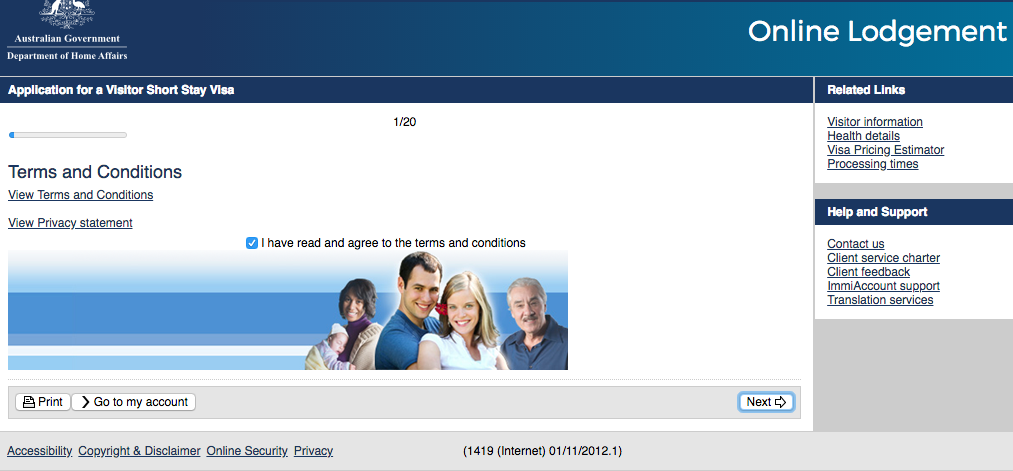
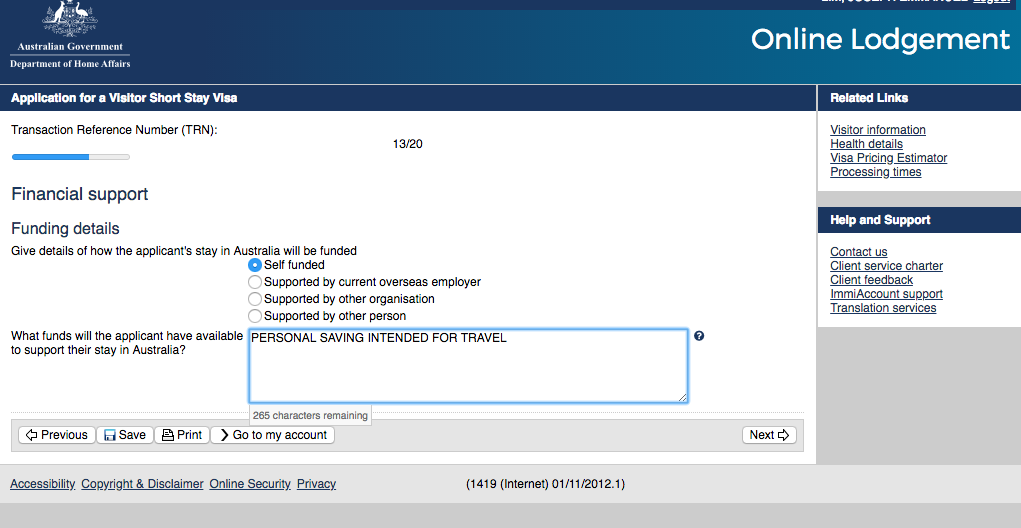
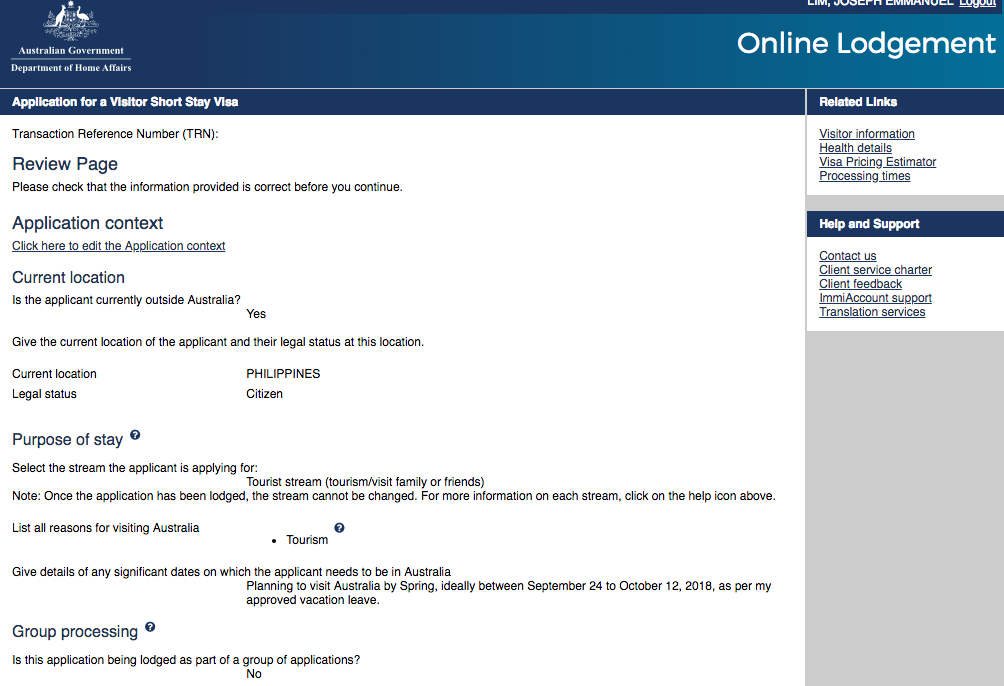
3. Start filling up your e600 form. Here is what you will likely see. Easy to understand.

4. After filling up,you will be led to a document uploading interface which looks like this. inappropriate file type and size will be prompted. refer to requirements given above.

5. After all scanned files have been accepted by the online interface, you will be prompted to the payment page. I I paid mine via credit card for AUD 140 (Around 5,500 Pesos)

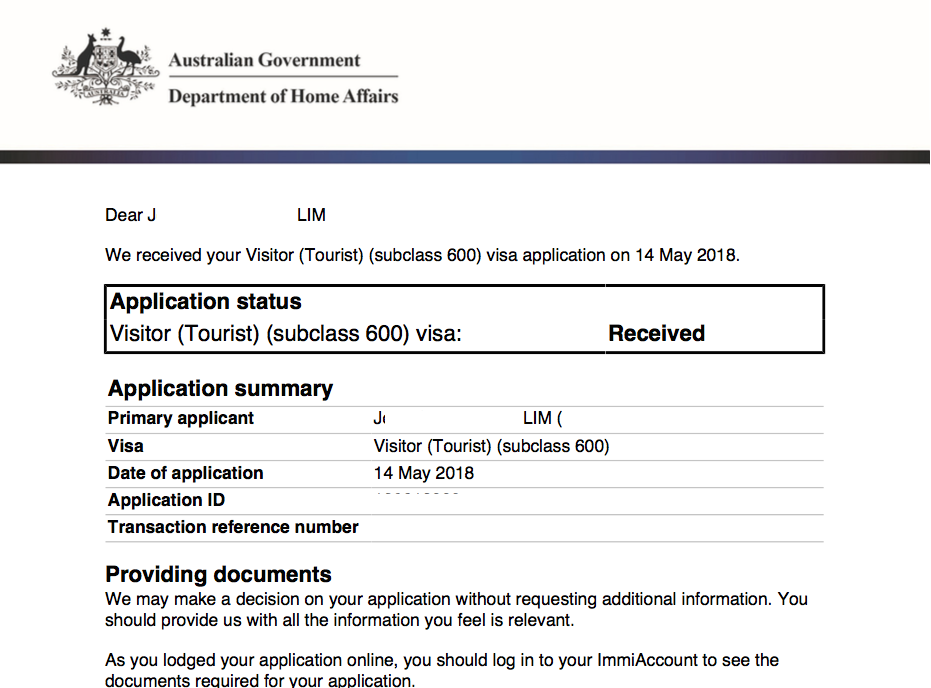
6. Submit and wait for Confirmation Email “Received”. This is the waiting time that your scanned documents will be evaluated. Also the perfect time for novena and pa-misa sa church for grace.

7. Receive decision via Email. I got mine after 10 days. The grant certificate will look like this. No need to submit your passport na to the embassy in Manila for verification and stamping. This certificate will suffice.

And that’s it! You have approval na and you’re ready to sell your kidney for travel funds.

Points to remember:

As per website, results are released 30 to 60 days after the submission. However, most of the recent applicants got their results earlier; provided, complete at valid ang scanned documents. I got mine after 10 days.

Since this is an online application, no need to print and submit paper requirements. Unless your uploads are not clear, then they may ask for those, or require you a personal appearance.

Bank account: As per usual travel blogs, bank accounts are ideally at 100 dollars x number of days stay x 2. better if more.

You can apply as early as 6 months before the trip.

Again, walang assurance ng approval. I feel that I got approved mainly because of the stamps I collected from my previous trips.

Lastly, IF UNSURE, WAG MAG DIY APPLICATION. Seek assistance from a reputable travel agency. PM me for recommendations. Chos! =)

New Zealand Tourist Visa for Filipinos 2018 – DIY Online Application Guide with Photos

LRM_EXPORT_406399622555966_20181002_222339421_Fotor

WAIVED NA PO ANG TOURIST VISA FEE FOR NEW ZEALAND!

True! Hindi po ito fake news. Before, it was mandatory to pay NZ$ 165. As of June 2017, A resolution has already been approved, stating that the Citizens of the Philippines do not have to pay anymore the fee or immigration levy for TOURIST/VISITOR VISA application, when coming to New Zealand for fewer than 60 days (Reference: https://www.immigration.govt.nz/new-zealand-visas/apply-for-a-visa/).

However, point out ko lang po clearly, NZ is NOT VISA FREE. It is only the big amount of fee that was taken out. We still have to submit necessary requirements to the NZ Embassy for the issuance of visa prior to our trip.

Traditional method of submitting paper requirements is still being implemented today. However, NZ Immigration already formulated a “Passport Handling-Online Application” method, which has taken visa application to the next level of easiness. With this method, applicants are only required to completely fill up a form on their website and then submit online the scanned copies of usual visa requirements. For this convenience,however,applicants shall pay a fee of less than 1,000 Pesos for the “Passport Handling”, which shall be discussed later. This is relatively a small amount compared to the big chunk of levy that has already been relieved from us. Passport handling fees may also be bank transferred na. This has made the application process more convenient, especially for us living far away from Manila/Cebu where embassy offices are located.
This guide blog focuses solely on Visitors (Tourist) Visa via Online Application. For other types of Visa, refer to https://www.immigration.govt.nz.

So without further ado (Char), here is a step by step guide on how I completed my application.

STEP 1 : Gather the visa requirements,

  1. Photo – passport sized (900 x 1200 pixels minimum), light colored background(except white, ideally light gray), JPEG Format straight from file. Bilhin nyo yung file ng picture sa studio. scanned from printed photo is not allowed; file size between 500KB and 3MB
  2. Valid Passport – scan pages with personal information; PDF Format
  3. Government issued Identification Card – either driver’s license, PRC, SSS, GSIS, TIN, Philhealth; PDF Format
  4. Proof of Employment – letter of approved leave from employer ideally with salary and other details ; PDF Format
  5. Evidence of Fund – Bank Certificate with ADB; Bank Statements; Updated Passbook; PDF Format
  6. Evidence of Onward Travel – Airline confirmed booking(meaning, ticket reservation from a reputable travel agency); PDF Format ; pwede rin Airline ticket mismo if you already have one, but not advised.
  7. Cover Letter – letter of intention. You may also put here your proposed day to day itinerary ; PDF Format
  8. Other Financial Document – Credit card billing statement, ITR; ; PDF Format
  9. For Self Employed – business permit, SEC or DTI registration. Annual ITR for the employed; PDF Format
  10. Record of Previous Travels – Scanned copy of your past and current passport with all stamps
  11. Copy of other Valid First World Visas (If available) – USA, Schengen, Japan or others; PDF Format

Re bank funds, some successful applicants mentioned “100 USD per day x # days stay x 2” maintaining balance. I guess we should prepare the same na din (or more) to prove our capacity to visit their country.

Step 2 : Go to https://www.immigration.govt.nz/new-zealand-visas/apply-for-a-visa

Select appropriate visa options. it will look something like this.

Click on the RealMe Link at the bottom to start application

Step 3: Create a RealMe Account which serves as your application form. This is where you will be uploading all your infos and scanned documents.

Provide usual infos, username and password. This step will also ask for an email verification.

After Email verification, your RealMe account will now look something like this. Click the “Visitor Visa” Highlighted in RED.

Step 4: Fill up RealMe Form in order that is given.

Fill up all the “Identity and Contact” requirements. one after the other. Save infos from time to time.

This may be intimidating, but just say No to all these entries, unless you seriously have a condition to declare.

The interface still asks for this stage even if you declared “single” early on. Samok ha!

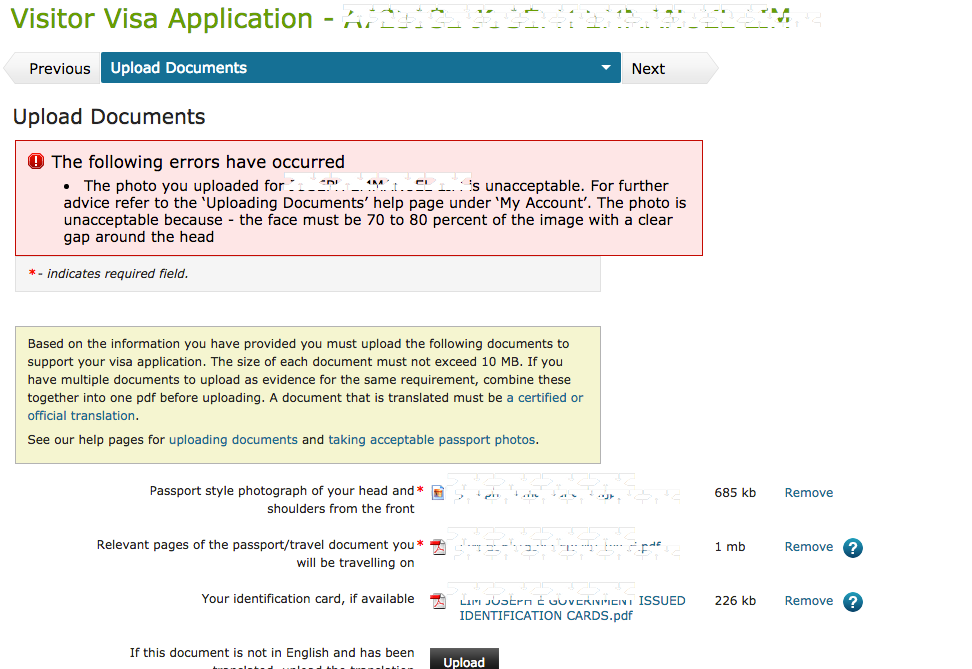
This is the part where you upload your JPEG and PDF files

The good thing about this interface is that it prompts you for detected errors such as this. Cool! Very first world!

Step 5: Submit online your completed RealMe Form. In 24 hours, you will receive an email confirmation and instructions on where to submit your passport. This is not yet your approval.

Step 6: Payment of Passport Handling Fee thru Bank.

While it is most common for applicants to submit their passports personally, NZ offers an option to pay through Banco de Oro, which is very favourable for people away from Manila. Passport handling will be catered by VFS Global, which is NZ embassy’s partner agency. Details can be found at http://www.vfsglobal.com/NewZealand/Philippines/how-to-apply.html

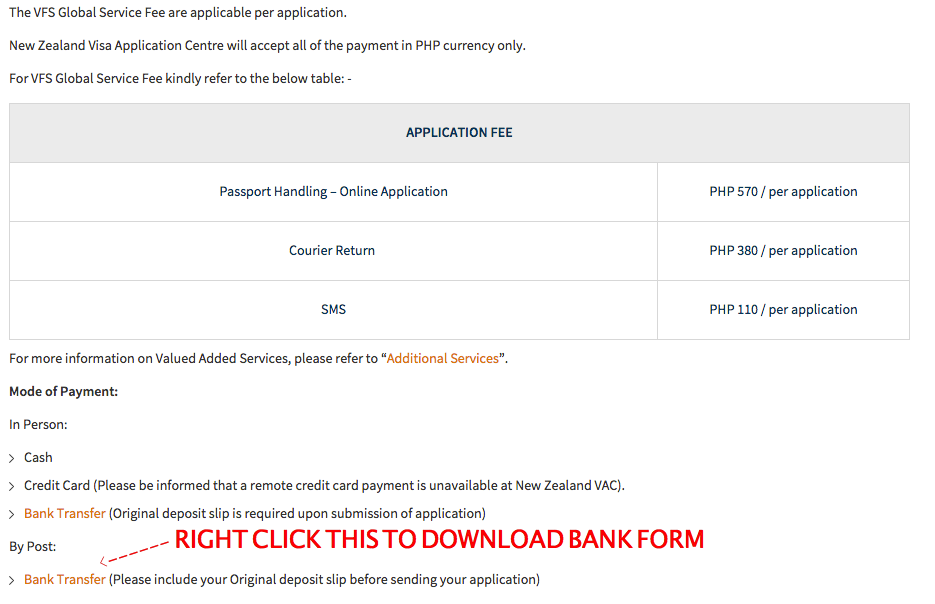
Instructions on Bank Transfer Payments are detailed on this website.

For my application, I paid the 570 Handling fee plus 380 Courier Fee for them to return my passport after assessment. I did not avail the SMS assistance anymore, since the updates on my application can be monitored on my RealMe Account

Print the bank form and show to the bank during payment.

Step 7: Submit Passport to VFS Office for Assessment and Verification

Photocopy Bank Deposit Slip/ Transfer Slip and submit this to VFS together with your valid passport, the printed and signed bank form, a printed copy of “thank you” page and the Email Confirmation. Applicants from the province may send their documents ti VFS via any preferred courier.

Step 8: Result

Once the result is released, VFS will send your passport back to your given address. Courier fee for the return is part of the prior payment.

NZ Visitor Visa issuance is indeed fast. I got my approval 4 days after submission of passport to VFS.

Points to remember:

As per website, results are released 20 days after the submission. However, most of the recent applicants got their results within 3 to 4 days!

Since this is an online application, no need to print and submit paper requirements. Unless your uploads are not clear, then they may ask for those.

You can apply as early as 6 months before the trip.

Grant on duration of stay varies. Wala talagang template for this. But definitely, your stay will not exceed 59 days at a time.

For online application, No more sticker on your passport. The approval certificate that will be emailed to you shall serve its purpose.

—0—-

So there, hopefully this blog will be of help by the time you apply for your own. Though I am fully aware that this guide will not guarantee approval for everybody. Kaya sabayan nyo nalang din ng Novena for 14 days with miryenda cream bread and mayonnaise.

This guide,however, is focused purely on tourism/holiday visit. For other types of application, see https://www.immigration.govt.nz for details.

Re Waived visa fee, there is no information on until when this waived fee will last. So while we are enjoying the current privilege, might as well consider visiting this green country very soon.

Lastly, if you are unsure of your documents, or if you find the D.I.Y. online application too complicated, please get in touch na lang with a reputable travel agency to process your papers.  Life is short, wag na pa stress!